

 The band is open.
Everyone's on the same airwaves, from longwave right up to the satellites. What gets through changes with where you are and the time of day.
For Windows, macOS and Linux.
Borrow our receiver
Simulated receiver
- Source
RTL-TCP- Host
argon.simtx.net- Port
1240
Put these in SDR++, or any rtl_tcp app, and press play. That receiver is located in Budapest.
To listen from anywhere else, install the app.
Amsterdamsent from JO22ki
We played a song from a file into a simulated 500 kW AM transmitter.
The transmitter
- Splatter
- Push the amplifier too hard and it runs hot, flat-tops, and splatters over the channels either side of you.
The ground
- Groundwave
- Close in, some of the signal hugs the ground, and it carries a lot farther over sea than over land.
The sky
- Openings
- Bands open and close with the time of day and the season, and a busy sun opens the higher ones. A geomagnetic storm makes signals flutter, worst on polar paths.
- Skip
- Signals come back down far away, so a station can be loud a long way off and missing closer in.
- Fading
- Skywave arrives by several paths at once. As they drift in and out of phase, the signal swells and dips.
- 0:33 fading
The receiver
- Noise
- On the low bands the static comes up after dark, with lightning crashes on top.
- Front end
- It behaves like an RTL-SDR: the gain moves in steps, and a strong station can turn up where it shouldn't.
Budapest
Reception report
- Frequency
- 6070 kHz
- Mode
- AM
- Power
- 500 kW
- Time
- 22:00 UTC, sim clock
- From
- JO22ki
- To
- JN97mm
- Path
- 1145 km
And recorded what came out of the sim's receiver. Everything after 0:24 went through the sim.
The modulator, the fading and the receiver are the sim's. We scripted the path, the levels, the storm, the clock and the overdriven rig, so it's a demo, not an off-air catch. Each time on the route is a link to that moment.
More on the wiki: Propagation Basics and Power Amplifier Behaviour.
Install the app
It puts a receiver anywhere on the map and a transmitter under your callsign.
For Windows (Installer), macOS on Apple silicon (.dmg) and Linux (AppImage). All builds, and how to install them.
Open this page on your computer to download it.

Start RX
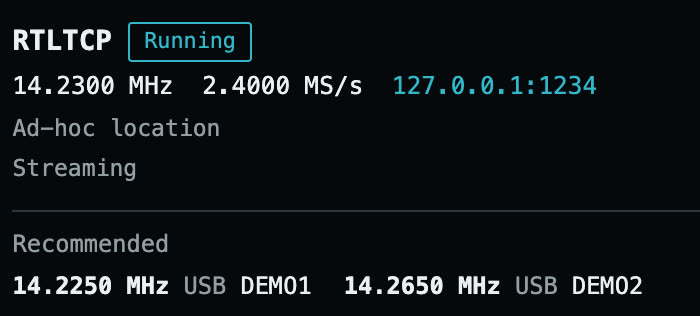
In the Receive tab, pick a spot on the map and press Start RX. That puts a receiver there, served from your own computer. Connect to it the same way as to ours:
Once SDR++ is connected, Recommended lists up to three stations you can hear in the span it's showing, or tells you there's nothing there.
Start TX
Type a callsign on the Transmit tab, press Quick station, then Start TX. You're on the air, and whoever the path reaches can hear you.

You can send AM, DSB, USB, LSB, CW, NFM, WFM, WSPR, FT8 and raw IQ. If you send IQ from GNU Radio, run the connection test first: it finds the highest sample rate your upload can keep up with.

Work your own satellite
Launch it from the app. It's a station in orbit: work it the way you'd work one on the ground.
Pick a preset orbit, anything from a space-station orbit out to geostationary, or set your own altitude and inclination. It carries up to 4 antennas and 8 radios. Once it's up, none of that can change.
When you're done with it, a deorbit burn brings it down. The globe marks where it came down, and you can launch another.
The app predicts every pass and steers your rotator through it. Here's one.
- AOS
- 03:43:47 UTC, 150°
- Highest
- 03:49:43 UTC, 45.8°
- LOS
- 03:55:38 UTC, 353°
Over the pass the signal drifts 6.76 kHz. The app can retune your radio to follow it.